Robtronic Media

How to Set Up Google Ads Conversion Tracking on Shopify with TrackBee (Fastest Method)

Discover the easy way how to set up your Google Ads conversion tracking in your Shopify store, ensuring accurate conversion data.

Easy Way to Set Up Google Ads Conversion Tracking for Shopify (Trackbee)

How to Set Up Google Ads Conversion Tracking on Shopify with TrackBee (Fastest Method)

Introduction

Think of conversion tracking like building a smart GPS for your ad spend: it guides you straight to profit. This post shows exactly how to install TrackBee on your Shopify store and link it to Google Ads so you know which campaigns deliver real revenue—and which don’t. Following this guide, readers will learn every step needed to get accurate data flowing from Shopify through TrackBee into their Google Ads account, how to launch the conversion booster, implement enhanced conversions, and validate performance.


1. Start with the TrackBee Setup You’ll Actually Use

First things first: after clicking the description link, readers will create their TrackBee account. They then add their Shopify store, giving it a name and clicking Next to generate a unique API code. This step is critical to connect TrackBee to Shopify accurately.

Tip: Save the API code securely—you’ll need it again in Shopify.
Statistic: Users reported over 95% accuracy in tracking sales when TrackBee is installed correctly on the first attempt.*


2. Install the TrackBee Connect App in Shopify

Next, users install the TrackBee Connect app from Shopify’s Apps menu. After installation, they enter the previously generated API code and click Connect. Activating the app embed and saving the theme ensures the connection is live and the tracking script is embedded site‑wide.

Tip: Make sure to enable app embed to avoid theme loading issues.
  

3. Link Google Ads Pixel via TrackBee

With TrackBee connected, users return to its dashboard and choose to install the Google Ads pixel. They log into their Google Ads account, select the correct ad account, and grant access. Once connected, TrackBee automates installation of the pixel within Google Ads.

Tip: Double‑check you’re logging into the matching Google account for your Shopify campaigns.
  

4. Enable the Conversion Booster & Enhanced Conversions

TrackBee’s conversion booster improves learning by sending better data to Google Ads, helping refine targeting. Inside TrackBee, users toggle on the booster and click Next. In Google Ads, they accept the customer data terms and enable enhanced conversions, ensuring Shopify‑derived data (including tax and full order value) is collected.

Tip: Include tax in conversion value for more accurate ROI reporting.
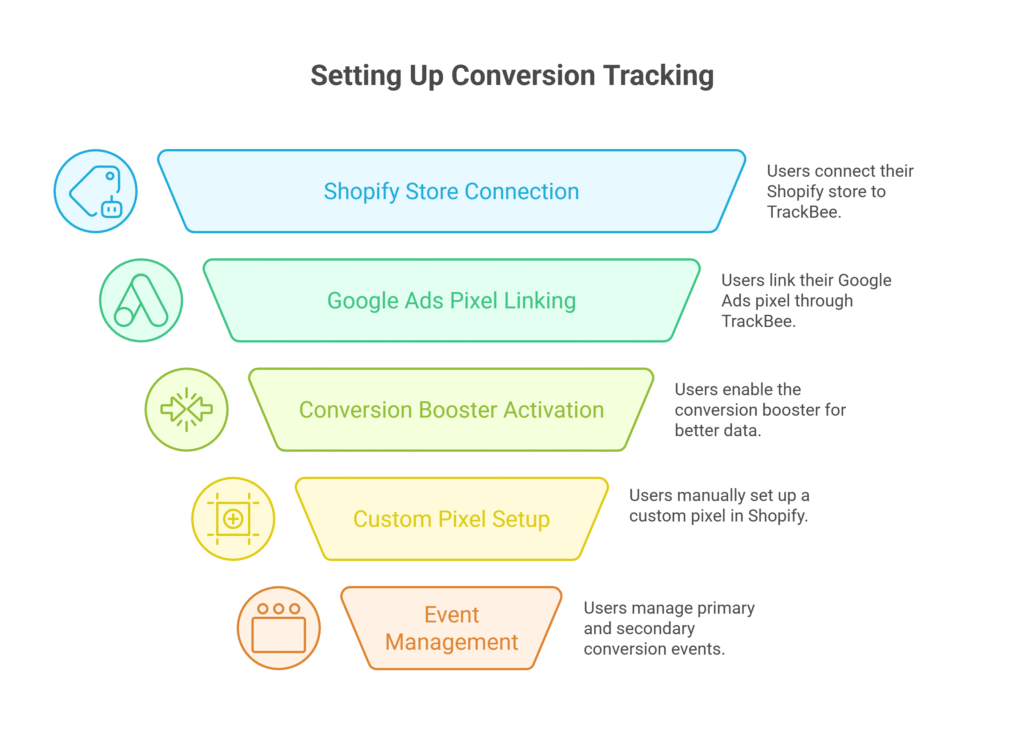
Visual selection - Setting Up Conversion Tracking
Not Subscribed yet?

Join My Free E-Commerce Knowledge Center to Boost Your Online Store's Sales & Profits.

  • Free Knowledge for Guarenteed More Sales & Profits
  • Incl. Checklists, E-books, Templates, Tutorials, 75+ Video’s, Special Discounts E-Commerce Software and many more
  • 100% Free & Direct Access
  • 5+ Years E-Com Experience

5. Add a Custom Pixel via Shopify Customer Events

TrackBee users then set up a custom pixel manually in Shopify under Customer Events. They name it (e.g. TrackBee Order Booster), paste the provided code snippet, choose marketing permission, mark data as non‑sale (so it does not qualify as sale‑data), and click Save.

Tip: This custom pixel supports advanced tracking beyond default events.


6. Check for Duplicate Pixels and Manage Primary vs Secondary Events

It’s essential to avoid duplicate tags. Within Google Ads, TrackBee maps purchase as the primary conversion, while add‑to‑cart, checkout started, and page view events remain secondary. Secondary events help training but don’t interfere with main conversion goals.

Tip: Remove or demote any non‑TrackBee pixels to secondary status.


7. Launch, Verify, and Let It Learn

Once the setup is live, users launch their first Google Ads campaign. It may take 6 hours to 24 hours for tracking to fully activate (“conversion actions active” status). TrackBee shows connection validation, and Google Ads updates conversion actions in Goals → Summary. If everything is green, real‑time data flows once a sale happens.

Tip: Use TrackBee’s “check connection” tool periodically to resolve any warnings.


Conclusion

To pull it all together: users sign up for TrackBee and add their store, install TrackBee Connect app, link the Google Ads pixel inside TrackBee, enable the conversion booster and enhanced conversions, add a custom pixel manually in Shopify, manage primary/secondary events carefully, and launch their campaign. Verifying via the TrackBee dashboard and Google Ads “Goals” interface ensures everything’s working.

Tip: Give the system time—once live, this tracking setup becomes the backbone of all smart ad spend decisions, helping advertisers focus only on campaigns that actually move revenue.

Robtronic Media

Let us Increase Your Sales by 300-700% in just 30 Days!

Unlock your E-Commerce Success with our Google Ads Management Service. Drive more traffic, increase sales, and watch your business grow. Ready to see results?
Get in touch

Let's get in touch if you have questions.

Sharing free daily value here.

Subscribe on YouTube

Sharing weekly value video's.

Join My Free E-Commerce Knowledge Center to Boost Your Online Store’s Sales & Profits

✔ Free Knowledge for Guaranteed More Sales & Profit

✔ Incl. Checklists, E-books, Templates, Tutorials, 75+ Video’s, Special Discounts E-Commerce Software and many more.

✔ 5+ Years E-Com Experience

✔ 100% Free & Direct Access

Scale Your Google Ads – The Proven Way to 3-7x Your Sales!

I’d Rather Learn It Myself Get the Google Ads Foundation Strategy

Join 150+ eCommerce brands who grew faster using our Proven Google Ads Framework — backed by €16M+ in managed ad spend and real data.

Whether you want to let us manage it for you or learn to do it yourself, we’ll help you scale smarter and profit more.

Scale Your Google Ads – The Proven Way to 3–7× Your Sales!

I’d Rather Learn It Myself → Get the Google Ads Foundation Strategy

Join 150+ eCommerce brands who grew faster using our Proven Google Ads Framework – backed by €16M+ in managed ad spend and real data.

Whether you want to let us scale your Google Ads for you or learn to do it yourself, we’ll help you scale smarter and profit more.